
Information for Participants

EVTM Asia 2026 | 8 - 10 October, 2026 | Chiba, Japan

On-site Registration

Registration Hours

The registration desk will be located in the foyer on the 2nd floor of the venue and will be open during the hours listed below.

08 OCT

8 October 2026

7:20 - 17:00

09 OCT

9 October 2026

7:30 - 11:00

10 OCT

10 October 2026

7:30 - 10:30

Bring Your Own Water Bottle

To help reduce plastic waste, participants are encouraged to bring a reusable water bottle. Water refill stations will be available at the venue.
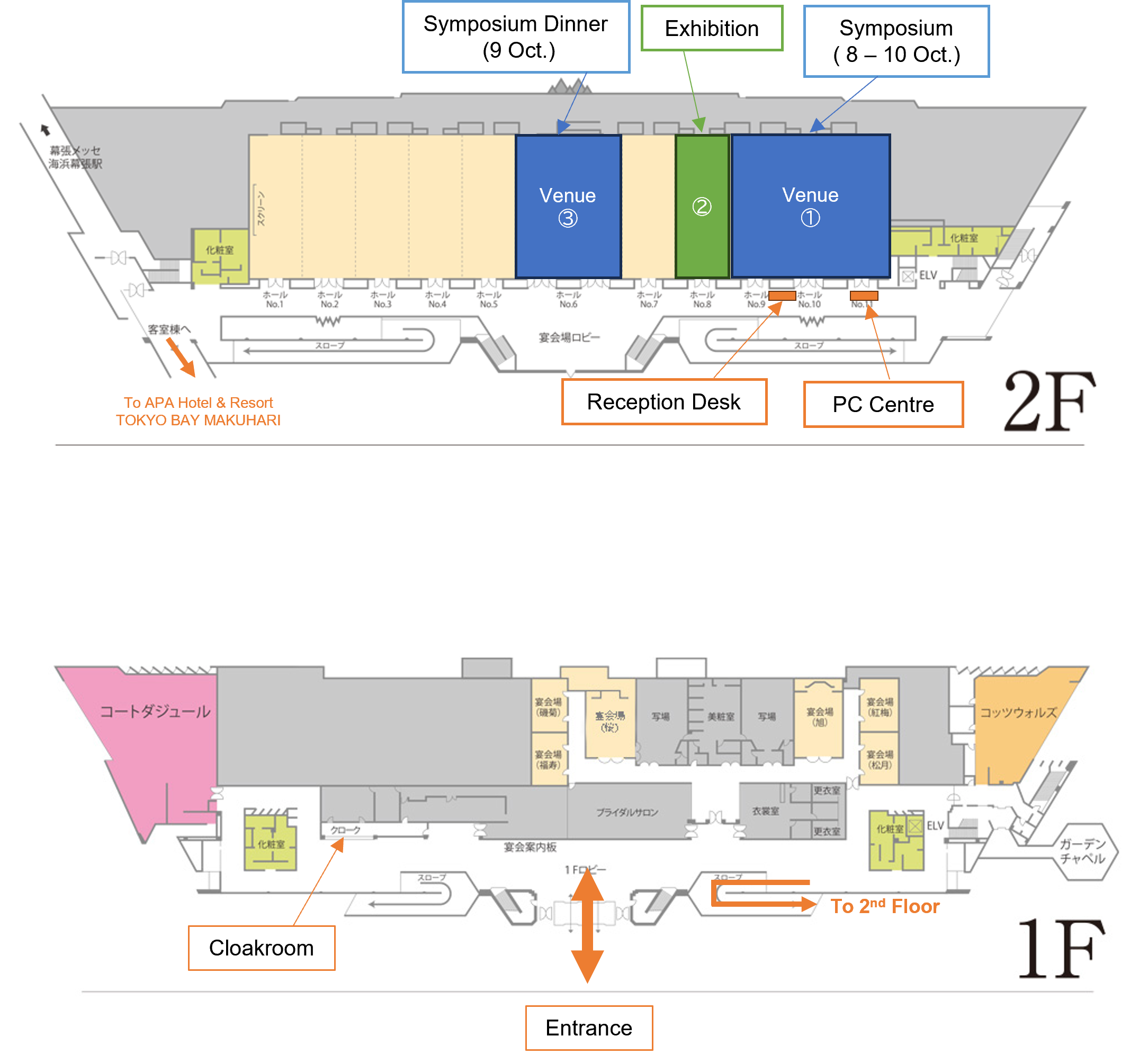
Conference Venue

Venue

EVTM Asia 2026 venue floor map showing the 1st floor entrance, cloakroom and route to the 2nd floor, and the 2nd floor reception desk, PC Centre, symposium rooms, exhibition area and symposium dinner area.
Symposium 8 - 10 October
Exhibition 2nd Floor
Symposium Dinner 9 October
Reception Desk / PC Centre 2nd Floor
Cloakroom 1st Floor
For Speakers

Guidelines for Speakers - Oral Presentations

01

Before the congress

Presentation File Preparation

To ensure smooth technical operation and proper display of your presentation, please prepare your file in accordance with the following requirements:

Software Microsoft PowerPoint 2019 or later
Screen Ratio 16:9 (recommended)
Fonts

To minimize display issues, please use standard OS fonts such as Times New Roman, Arial, Arial Black, Arial Narrow, Century, Century Gothic, Courier, Courier New, or Georgia.

Presenter View

PowerPoint Presenter View cannot be used with the lectern equipment. If Presenter View is essential for your presentation, please prepare a printed or separate script, or use your own PC.

02

At the venue

PC Centre Check-In

All speakers are requested to visit the PC Centre, located next to the reception desk, at least 30 minutes before their presentation. Please submit your presentation file and confirm that it displays correctly before proceeding to the session room.

  • If your presentation includes audio or video, please inform the PC Centre staff when submitting your file.
  • Please bring a backup copy of your presentation on a USB flash drive. Before arrival, ensure that the USB flash drive has been scanned using up-to-date antivirus software.
  • The Secretariat provides Windows PCs only. If you wish to use a Mac, or if you wish to use PowerPoint's Presentation View, please bring and use your own PC:
    • Please bring the required power adapter and HDMI monitor connector.
    • Before your presentation, please disable password locks, screen savers, virus scans, and power-saving settings.
  • All presentation files submitted to the Secretariat will be securely deleted after the congress.
03

During your session

On-Site Presentation Procedures

Allocated Presentation Time 10 minutes (6 min. presentation + 4 min. Q&A)
Screen Blackout At the 7-minute mark
  • If you are using your own PC, please bring it directly to the venue operator at least 15 minutes before your session. Personal computers cannot be stored at the PC Centre.
  • Please take your designated seat near the lectern at least 10 minutes before your session begins.
  • To keep the program running on schedule, please observe the allocated presentation time strictly.
  • A timing device will be available at the lectern to help you monitor your presentation time.
Yellow warning light 1 minute remaining
Red warning light 30 seconds remaining

Important: Although each oral presentation is allocated 10 minutes in total, the presentation screen will automatically black out at the 7-minute mark. Please plan your slide-based presentation accordingly and ensure that all material requiring screen projection is completed within your 6 min presentation.